My account

How do I create my account?
To create your account, click on the Log in button at the top right of the screen or click directly here.
How can I edit my account information?
Editing your profile couldn't be simpler:
- Log in by clicking on the Log in button at the top right of the screen.
- Once logged in, click on your profile picture at the top right, then on Profile.
How do I delete my account?
We're sorry to see you go.
- Log in by clicking on the Log in button at the top right of the screen.
- Click on your profile picture, then on Settings.
- At the bottom of the page, click on Delete my account and follow the instructions.

Is signing up free?
Yes, signing up to BikUp is completely free.
Once signed up, you can browse listings, compare them and send booking requests.
How do I get a complete profile?
A complete profile inspires confidence and increases your chances of having your requests accepted.
Log in, click on your profile picture at the top right, then on Profile to complete your information (photo, description, contact details, etc.).
How do I change my email address?
To change the email address associated with your account:
- Log in to your account.
- Click on your profile picture, then on Profile.
- Change your email address and click on Save.
I forgot or lost my password
If you've forgotten your password, click here and enter the email address associated with your account.
You'll receive an email containing a link to reset your password.
What should I do if I can't log in to my account?
Check that the email address and password you're using are correct.
If needed, you can use the Forgot password feature.
If the problem persists, contact our support team at support@bikup.app.
To confirm ownership of the account, you may be asked for a copy of your ID document.
How do I change the site language?
To change the language of your interface:
- Log in to your account.
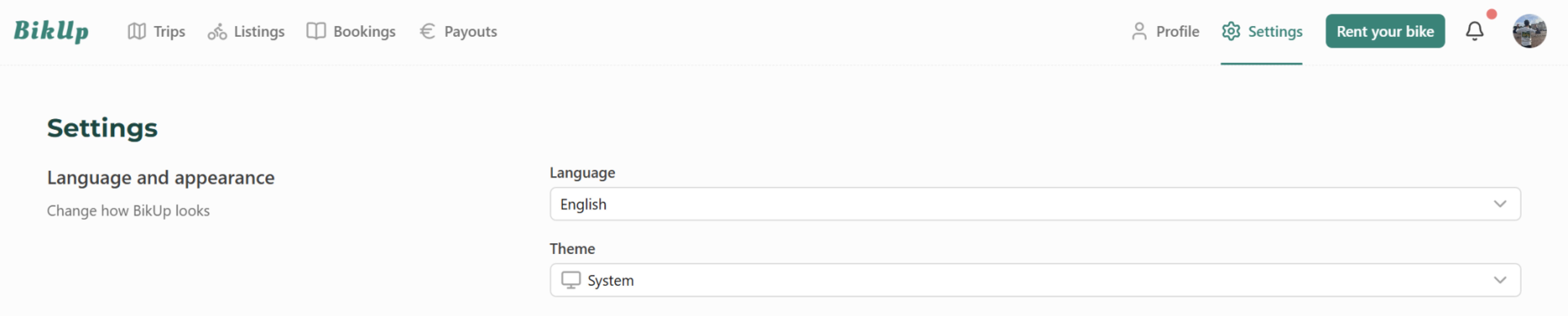
- Click on your profile picture, then on Settings.
- At the bottom of the page, in the Language and appearance section, select the language you want.
Where can I find a summary of my rentals?
To view all your past and upcoming bookings:
- Log in to your account.
- Click on your profile picture, then on Trips.
You'll find the details of all your rentals there.
What are the rules for conversations with owners?
At BikUp, we encourage respectful, clear and secure exchanges between owners and renters.
- Respect and courtesy
Use a polite and friendly tone. A respectful dialogue makes for a positive experience for everyone. - Using BikUp messaging
Avoid sharing your personal contact details before the booking is confirmed. Exchanges through the platform guarantee security and traceability. - Respecting the agreed terms
Once the booking is accepted, stick to the terms you defined together, especially meeting times and places.
If you run into any difficulty or dispute, our support team is here to help you.